Publish/unpublish
Here we gather information on how to publish/unpublish a page. These steps also assume that you are logged in and have Sitevision up and running, as described in previous steps.
Table of contents
Background
When you write information on a page it's automatically is going to be saved and stored. However, it wont be visible for visitors until it gets published. Even though a page itself is published, all changes to it has to be published aswell.
Characteristics
You can easily see if a page has unpublished information or not by looking at the icons in the navigator.
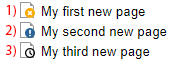
The top page shows a symbol indicating that the page is completely unpublished and can only be accessed via Sitevision.
The second page shows a published page that visitors access and view, but it contains changes however, that have yet to be published.
The third page has been scheduled to be published but at a later time / date.
Start publishing
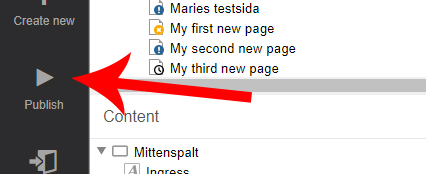
Select the page that you wish to publish to visitors and select the "Publish" option in the left toolbar.
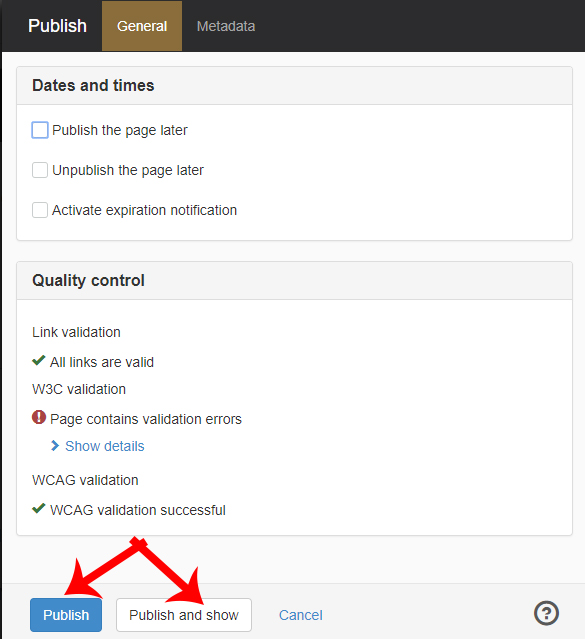
A box opens with publishing options. You can, for example, decide to publish or unpublish the page at a later time. If no time is specified then the page will be published immediately. The page also undergoes some quality controls that may end up in you having to have to fix broken links.
Then press either the "Publish" button to publish the page and stay in Sitevision. Or press "Publish and view" to publish the page and close Sitevision.